‏إظهار الرسائل ذات التسميات Office tools. إظهار كافة الرسائل

الجمعة، 21 سبتمبر 2012

Kingsoft Office Suite Free 2012 8.1.0.3375

Kingsoft Office Suite Free 2012 8.1.0.3375
Kingsoft Office Suite Free 2012 is an office suite that offers a number of features for creating, viewing and editing personal and business documents. Kingsoft Office 2012 includes Kingsoft Writer, Kingsoft Presentation and Kingsoft Spreadsheet. These three reliable and versatile programs are perfect for both personal use at home and for professional businesses. They offer outstanding value at their listed cost compared to competing office programs.


Kingsoft Office 2012 is compatible with all of the latest Microsoft Office file formats. It will easily open, read and write documents created with Microsoft Office as well as a wide variety of other formats. Microsoft Office can also open Kingsoft files without having Kingsoft Office installed on the same computer.

Main Features :
Better and Deeply Compatible with Microsoft Office Suite
  • Open, edit and save Word files : (97/2000/2003/2007/2010) .doc, .docx.
  • Open, edit and save Excel files: (97/2000/2003) .xls, .xlsx.
  • Open, edit and save Powerpoint files: (97/2000/2003) .ppt, .pptx.
Bulit-in PDF Converter
  • Save files including Writer, Spreadsheets, Presentation as PDF format.
  • Convert Kingsoft Writer, Spreadsheet, Presentation to PDF files.
  • Open and convert Microsoft Word (.doc, .docx), Excel (.xls, .xlsx), PowerPoint (.ppt, .pptx) to PDF files.
Automatic spell check
  • Provide a built-in spell checker you can use to proofread your document.
  • Mark the incorrect words in red underlines when typing.
  • IProvide some recommended words to help in improving your document.
Multiple document tabs
  • Avoid the hassles caused by switching between multiple document windows.
  • The tab bar that appears above the editable area allows you to switch between documents quickly and conveniently.
  • The tab bar that appears above the editable area allows you to switch between documents quickly and conveniently.
Small data package
  • The install package is just 70MB, which is only one-tenth the size of other office software.
  • The software installs within just one minute.
  • Although it is really small, it includes Writer, Spreadsheet and Presentation to meet your daily needs in office work and document processing.
Document encryption
  • Provide a document encryption function which can set a password to files.
  • Set a password to open and edit documents.
  • Enter an open password to only browse the document but not modify it. Enter an edit password to both browse and modify the document.
  • Protect privacy to prevent others seeing or changing the files.
  • Humanized table operation
  • Quickly select and move tables by clicking the shortcut operations on the table.
  • Add additional rows and volumes by clicking shortcut operations on the table.
Share files via email
  • View and edit email attachments by Kingsoft Office.
  • The built-in emailling function makes it easy to share documents.
What's new in Office Suite Free 2012
  • New: Automatic spell checker. A built-in spell checker will automatically proofread the text you enter as you create your documents.
  • New: Activate and update the software online.
  • Improved: A new and improved layout allows for much quicker document processing compared to previous versions. Editing the layout, finding and replacing words and inserting pictures are only some of the processes improved by the new layout.
System Requirements for Kingsoft Office Suite Free 2012
  • Required Operating System: Windows 2000/Windows XP/Windows Vista/Windows 7
  • Basic Configurations:
  • CPU: Pentium II 266 MHz or higher
  • Memory: at least 128 MB
  • Hardware: at least 200 MB available space
  • Recommended Configurations:
  • CPU: Pentium III 450 MHz or higher Memory: 256 MB or larger
  • Hardware: 250 MB available
  • Kingsoft has devoted over two decades to the development of user-friendly software, customer-oriented services and the best office software.
Free Download 39 MB {Freeware} Kingsoft Office Suite Free 2012 8.1.0.3375
اقرء المزيد

الخميس، 30 أغسطس 2012

Nitro PDF Reader 2.5.0.41 Free Download

Nitro PDF Reader 2.5.0.41
Nitro PDF Reader is free, fast, powerful, and secure for view , print , create PDF files from over 300 different formats, comment , and collaborate. Fill and save PDF forms. Extract text and images. Type text directly onto the page.

Screenshots

User experience
Simplicity and familiarity
  • Nitro Reader utilizes the Microsoft® Office®-style Ribbon interface. Tasks and tools are separated into tabs, grouped by functionality, and represented graphically with easy-to-understand text labels, providing an immediately familiar user interface that won’t leave you searching for help.
Your favorite tools in one place
  • The Quick Access Toolbar (QAT) allows you to create an easily accessible group of shortcuts to the tools you use most frequently. Retain constant onscreen access to the core functionality required in your workflows, while less-used features are still easily at hand.
Intelligent display panes
  • Nitro Reader offers navigation panes, including Pages, Bookmarks, Comments, Output, Signatures, and Attachments, allowing for easy navigation of larger documents, and providing a central location for additional content. The panes are context-intelligent, and appear or hide depending on the content within the file being opened — when you open a PDF file containing bookmarks, the Bookmarks pane automatically becomes visible.
Instant in-application help
  • Extended tooltips on mouse-overs give you a fast and direct way to learn about each tool and task in Nitro Reader without having to leave the application or look elsewhere.
Know your PDF files
  • When you open PDF files with additional properties such as security restrictions, digital certificates, or form fields, you get notified immediately. If you don’t want to be notified each time, just switch off this option in Preferences.
Viewing & navigating
Find
  • Quickly and easily find the text you need in larger documents with Nitro Reader's search capabilities. Simply use the keyboard shortcut or click in the Find box to search for any word or phrase. Click Find Next or Find Previous to cycle back or forward through occurrences. Refine your search by restricting to whole words and/or case sensitive matches.
Zoom In/Out
  • Zoom in and out with any PDF file, using handy keyboard shortcuts or typical mouse-based controls. Constantly visible in the Page Controls area of the interface is the level of zoom as a percentage, which can be altered with a numerical entry, and a sliding bar for scalable adjustment.  
Rotate
  • Nitro Reader allows you to quickly and simply rotate any page by 90 degrees, to the right or left.
A view for every PDF
  • Select the most appropriate Page View for the document you're viewing: Single, displaying one and only one page at a time; Continuous, displaying all pages as a single uninterrupted column; Facing, displaying two pages side-by-side like a magazine or book; and Facing Continuous, with facing pages side-by-side as two vertical columns.
Full-screen viewing
  • For the closest experience to paper, select Full Screen view to display the PDF itself as the only on-screen object, with no extraneous functionality or content.
Work with multiple PDF files at the same time
  • Nitro Reader offers tabbed viewing of individual PDF files, enabling you to easily work between multiple documents within the same window, and even split open documents horizontally or vertically for simultaneous viewing.
Preview PDF files inside your email
  • Users of Windows 7 and Vista can use Nitro Reader's preview technology to view attached PDF files from directly within the Reading pane in Microsoft® Outlook®, with core navigation controls available in-application, enabling you to view and read documents as you receive them.
Preview PDF files in Windows Explorer
  • With Nitro Reader installed on Windows 7 or Vista, you can preview the content of any PDF file from within Windows Explorer. You'll never unnecessarily open a document again.
View PDF files inside your Web browser
  • View PDF files inside Mozilla Firefox®, Internet ExplorerTM, and Google Chrome®.
At-a-glance document viewing
  • Easily view large documents and negate the need to scroll page-by-page with the Pages Pane, as well as the ability to specify a page size and view best suited to the document you're viewing.
Read with chapters and headings
  • Navigate documents (that contain bookmarks) with ease in the Bookmarks pane by using an overview of chapters and headings — allowing you to go directly to the section you're looking for. Use an interactive table of contents to navigate a PDF file from its structure.
See all document properties
  • View file summary information including metadata, creation information, PDF version type, page size, fonts used, initial view settings, and much more.
PDF creation
300+ file-types
  • Nitro Reader offers PDF creation from over three hundred formats. Control the way you distribute your work and ensure the recipient enjoys the viewing experience you intended, by sharing documents in a reliable, universal format.
Drag-and-drop creation
  • You can drag almost any file onto the Nitro Reader desktop icon to create a PDF file, automatically opening the resultant PDF in Nitro Reader. This process can also be undertaken by simply dragging the file into the application's Document pane.
Create from file
  • Nitro Reader offers in-application functionality to create PDF from any file, with predefined profiles, as well as completely customized output options.
Create PDF from the print dialog
  • Installation of Nitro Reader also adds the Nitro PDF Creator to your list of available printers. From any application that can print, simply select the Nitro PDF Creator when printing to create a PDF.
Customized creation
  • Create the perfect PDF for your needs, with three easy preset creation profiles, including lightweight 'Web-ready,' versatile 'Office-ready,' or higher quality 'Print-ready.' Completely control the PDF files you create, with options to specify document information (metadata), font embedding, page size, orientation, and quality, password security, and Initial View settings.
Content extraction
Convert to plain text
  • Repurpose text easily by converting any PDF file to plain text format. Control the output by selecting whether you wish to retain paragraphs and headers/footers, as well as the ability to specify line-width by number of characters.
Snapshot tool
  • The Snapshot tool allows you to select any on-screen area, regardless of content, and copy it directly to your Clipboard for quick and easy reuse of images, text, or anything within your PDF file.
Extract images
  • Nitro Reader enables you to save all images contained in a PDF document as separate files to any folder or destination without modifying the original PDF file. Specify the format (BMP, JPG, PNG, and TIF), differentiate between color and monochrome with separate options, and use the Extract Images tool to create an exhaustive inventory of graphical content from any PDF file. With intelligent extraction, Nitro Reader can even choose the most appropriate format for each image.
Comment, review, & collaboration
Add notes
  • Nitro Reader provides functionality to add virtual sticky notes anywhere within a document. Notes can be shown or hidden at will, providing an easy medium for you to draw attention to a particular area, or include special instructions for a document.
Markup text
  • Highlight, cross-out, and underline text within PDF files, allowing you to draw attention to text requiring revision. Highlight a particular portion of text then add a comment to the highlight, which can be replied to in sequence, allowing for easy-to-follow document revision.
Type text anywhere
  • With the Type Text tool, you can easily add text directly onto the pages a document. Nitro Reader allows you to easily expand upon or add to a particular portion of text, in whatever font, size, and color you specify.
Read comments with ease
  • Nitro Reader's Comments pane provides an easily digested list of all markups, comments, annotations, and revisions within a document. Comment threads can be expanded or collapsed, sorted by type, page, author, date, color, and subject, and individually replied to or deleted. As an intelligent pane, it will only appear if comments are present within the PDF file being opened.
Reply to everything
  • Nitro Reader enables you to reply individually to every single comment or annotation in the document — notes, highlights, stamps, drawings, measurements, and more.
Edit & revise existing feedback
  • Correct, edit, and even delete the comments already added to the PDF files you review.
Customize pop-up notes
  • Customize the appearance and detail of the annotations you add, including color, opacity level, author name, and subject.
View comments from any source
  • View all kinds of annotations used across all popular PDF viewers, including Adobe Acrobat and Nitro PDF Professional.
PDF forms
Fill in & save forms
  • Nitro Reader, unlike some solutions, allows you to save any content entered in PDF form fields to retain an electronic copy of the completed form. You'll never scan or unnecessarily physically mail a form again. You can also reset all fields, allowing you to reset the form to its original, un-filled state if needed.
Fill static forms
  • Some forms originate from a scanner, or were never properly setup in the first place. Nitro Reader's Type Text tool allows you to fill out a form that happens to be a PDF — even if it's not a "PDF form".
  • XFA Form Support – fill-in and save static XML Form Architecture (XFA) forms
QuickSignTM
Create a signature
  • Simply add a scanned image of your signature to start signing PDF files. Nitro Reader automatically applies a transparency layer to ensure a realistic signature can be added without compromising the PDF file's original content.
Apply your signature
  • Use the QuickSignTM tool to place your signature anywhere in the document. Then, you can resize and move the image to ensure it is correctly located, before embedding the signature permanently by double-clicking it or saving. Your signature is then embedded in the PDF file and ready for sharing.
Protect signing
  • Nitro Reader enables you to add multiple signatures for multiple users, and password-protect them individually to ensure no signature in Nitro Reader is ever misused.
View & manage signatures
  • The Signatures pane provides a complete inventory and detailed history of all digital signatures and certifications within the PDF file, including those added in other solutions.
Security & protection
Restrict internet access
  • Some PDF files require internet connectivity to share or obtain information. With Nitro Reader, you can completely disable internet interactivity from your PDF files, or specify a list of trusted sites, allowing you to operate securely at a level that suits your workflows and matches your level of comfort.
Disable JavaScript
  • Prevent unauthorized JavaScript-based activity and malicious attacks by simply disabling JavaScript completely, mitigating all risk originating from this functionality.
Free Download 30.7 MB (Freeware) Nitro PDF Reader 2.5.0.41 32-bit | 64-bit
اقرء المزيد

الاثنين، 27 أغسطس 2012

LibreOffice 3.6.1 RC 2 Free Download

LibreOffice 3.6.1 RC 2

LibreOffice is the free power-packed Open Source personal productivity suite for Windows, Macintosh and Linux, that gives you six feature-rich applications for all your document production and data processing needs.
Writer is the word processor inside LibreOffice. Use it for everything, from dashing off a quick letter to producing an entire book with tables of contents, embedded illustrations, bibliographies and diagrams.

Calc tames your numbers and helps with difficult decisions when you're weighing the alternatives.
Impress is the fastest and easiest way to create effective multimedia presentations.
Draw lets you build diagrams and sketches from scratch. A picture is worth a thousand words, so why not try something simple with box and line diagrams?
Base is the database front-end of the LibreOffice suite.
Math is a simple equation editor that lets you lay-out and display your mathematical, chemical, electrical or scientific equations quickly in standard written notation.

Free Download 199.80MB (Open Source) LibreOffice 3.6.1 RC 2 Or here

اقرء المزيد

الخميس، 23 أغسطس 2012

Free Download OpenOffice 3.4.1

OpenOffice 3.4.1
OpenOffice.org is the leading open-source office software suite for word processing, spreadsheets, presentations, graphics, databases and more. It is available in many languages and works on all common computers

Great software
OpenOffice.org is the result of over twenty years' software engineering. Designed from the start as a single piece of software, it has a consistency other products cannot match. A completely open development process means that anyone can report bugs, request new features, or enhance the software.
Easy to use
OpenOffice.org is easy to learn, and if you're already using another office software package, you'll take to OpenOffice.org straight away. Our world-wide native-language community means that OpenOffice.org is probably available and supported in your own language.
... And it's free
Best of all, OpenOffice.org can be downloaded and used entirely free of any licence fees. OpenOffice.org is released under the LGPL licence. This means you may use it for any purpose - domestic, commercial, educational, public administration.

Free Download 129 MB (Freeware) OpenOffice 3.4.1
اقرء المزيد

الثلاثاء، 21 أغسطس 2012

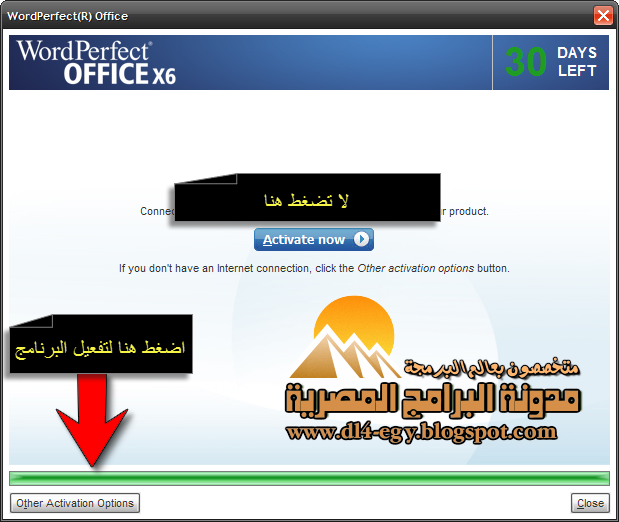
Corel WordPerfect Office X6 16.0.0.388 SP1 Full Cracked


برنامج رائع جدا ومن اهم مميزاته هو قدرته على التعديل على ملفات pdf وحفظها باى صيغه اخرى وهناك ميزة جديده الا وهي انك تستورد للبرنامج ملفات اكروبات pdf من كتابة ونصوص وصور او حتى تستطيع ان تستخدم جهاز اسكانر وتحرر في الصورة وتتلاعب في النصوص بداخلها ايضاً تخيل هذا تلاعب في مستندات رسمية اي بمثابة التزوير يبعدنا الله عنه .. البرنامج رائع وقوي حقيقه وله مواصفات كثيرة وكان البعض يرى في هذا البرنامج الفشل الذريع مقارنة بالادوات المكتبية في اوفس ولكن هذا بدأ يوصل للمكان المطلوب وسيتقدم لان هناك فريق عمل نشيط يقوم بتطويره .


Corel® WordPerfect® Office X5 – Standard Edition is the essential office suite for word processing, spreadsheets, presentations and email. Chosen over Microsoft® Office by millions of longtime users, it integrates the latest productivity software with the best of the Web. Work faster and collaborate more efficiently with all-new Web services, new Microsoft® Office SharePoint® support, more PDF tools and even better compatibility with Microsoft Office. It's everything you expect in an office suite—for less. Do more online and off with WordPerfect Office X5—

• Work with Microsoft® Office users. Easily open, edit and create Microsoft® Word, Microsoft® Excel® and Microsoft® PowerPoint® files.*

• File Compatibility. Open new and old files with broad support for over 60 file formats, including current open standards such as OOXML and ODF. In fact, open older Microsoft files that even Microsoft Office 2007 can't open.
• Choose Your Work Environment. Are you new to WordPerfect Office? Use the Workspace Manager to automatically adopt the familiar keystrokes and menus of Microsoft Office.
• Open Document Format (ODF). Open and edit ODF word-processing files, the ISO-standard for storing and archiving documents.
• Windows Vista® and Windows® XP Support. Work with the latest Microsoft operating systems.


FEATURES
• More Built-in PDF Capabilities. Adobe® Acrobat® not required. Turn your documents, spreadsheets and presentations into PDFs to share with anyone — without having to download or buy additional software.
• PDF Import. Access and reuse PDF content directly in WordPerfect X4 Standard or Pro edition. Simply import the PDF, work with the text and graphics, then save the file to a wide variety of formats*.
• New! Import Image-Based PDFs. With WordPerfect Office X4 Standard and Pro editions, you can easily reuse text by converting PDF files - even scanned, image-based PDFs - into editable text.
• New! Password Protection. Control who can view, copy, edit or print your work by adding a password to a PDF you create in WordPerfect Office X4 Standard, Pro or Home & Student edition.
• New! Tagged PDF Support. Ensure that the PDFs you create in WordPerfect Office X4 Standard, Pro or Home & Student edition can be read by devices for the visually impaired, meeting government accessibility standards.
• New! Support for PDF/A. Easily archive files to meet ISO standards. PDF/A, the de facto archiving format, is a subset of PDF that excludes features that are not suited to long-term archiving, such as external document linking.
• PDF File Size Options. The PDFs you create in WordPerfect Office X4 Standard, Pro or Home & Student edition can be output to a variety of media, including the Web, email or print. Tailor file size and printing resolution options to best suit the platform on which your work will be viewed

واليكم الشرح الحصرى الخاص بمدونات البرامج المصرية
شرح تفعيل البرنامج تفصيلى
تنفيذ واعداد رامى درويش


سعر البرنامج
$229.99
وطبعا ليكم ببلاش كل عام وانتم بخير
حجم البرنامج
Size : 398 Mb

تاريخ الاصدار :
18/08/2012

لتحميل مولد السريالات
only keygen

Here Or Here Or Here


اذهب الى صفحة التحميل واضغط 
Download Trial

ولتحميل البرنامج
Free Download 
اقرء المزيد

الجمعة، 17 أغسطس 2012

Nitro PDF Reader 2.5.0.40 Free Download

Nitro PDF Reader 2.5.0.40
Nitro PDF Reader is free, fast, powerful, and secure for view , print , create PDF files from over 300 different formats, comment , and collaborate. Fill and save PDF forms. Extract text and images. Type text directly onto the page.

Screenshots

User experience
Simplicity and familiarity
  • Nitro Reader utilizes the Microsoft® Office®-style Ribbon interface. Tasks and tools are separated into tabs, grouped by functionality, and represented graphically with easy-to-understand text labels, providing an immediately familiar user interface that won’t leave you searching for help.
Your favorite tools in one place
  • The Quick Access Toolbar (QAT) allows you to create an easily accessible group of shortcuts to the tools you use most frequently. Retain constant onscreen access to the core functionality required in your workflows, while less-used features are still easily at hand.
Intelligent display panes
  • Nitro Reader offers navigation panes, including Pages, Bookmarks, Comments, Output, Signatures, and Attachments, allowing for easy navigation of larger documents, and providing a central location for additional content. The panes are context-intelligent, and appear or hide depending on the content within the file being opened — when you open a PDF file containing bookmarks, the Bookmarks pane automatically becomes visible.
Instant in-application help
  • Extended tooltips on mouse-overs give you a fast and direct way to learn about each tool and task in Nitro Reader without having to leave the application or look elsewhere.
Know your PDF files
  • When you open PDF files with additional properties such as security restrictions, digital certificates, or form fields, you get notified immediately. If you don’t want to be notified each time, just switch off this option in Preferences.
Viewing & navigating
Find
  • Quickly and easily find the text you need in larger documents with Nitro Reader's search capabilities. Simply use the keyboard shortcut or click in the Find box to search for any word or phrase. Click Find Next or Find Previous to cycle back or forward through occurrences. Refine your search by restricting to whole words and/or case sensitive matches.
Zoom In/Out
  • Zoom in and out with any PDF file, using handy keyboard shortcuts or typical mouse-based controls. Constantly visible in the Page Controls area of the interface is the level of zoom as a percentage, which can be altered with a numerical entry, and a sliding bar for scalable adjustment.  
Rotate
  • Nitro Reader allows you to quickly and simply rotate any page by 90 degrees, to the right or left.
A view for every PDF
  • Select the most appropriate Page View for the document you're viewing: Single, displaying one and only one page at a time; Continuous, displaying all pages as a single uninterrupted column; Facing, displaying two pages side-by-side like a magazine or book; and Facing Continuous, with facing pages side-by-side as two vertical columns.
Full-screen viewing
  • For the closest experience to paper, select Full Screen view to display the PDF itself as the only on-screen object, with no extraneous functionality or content.
Work with multiple PDF files at the same time
  • Nitro Reader offers tabbed viewing of individual PDF files, enabling you to easily work between multiple documents within the same window, and even split open documents horizontally or vertically for simultaneous viewing.
Preview PDF files inside your email
  • Users of Windows 7 and Vista can use Nitro Reader's preview technology to view attached PDF files from directly within the Reading pane in Microsoft® Outlook®, with core navigation controls available in-application, enabling you to view and read documents as you receive them.
Preview PDF files in Windows Explorer
  • With Nitro Reader installed on Windows 7 or Vista, you can preview the content of any PDF file from within Windows Explorer. You'll never unnecessarily open a document again.
View PDF files inside your Web browser
  • View PDF files inside Mozilla Firefox®, Internet ExplorerTM, and Google Chrome®.
At-a-glance document viewing
  • Easily view large documents and negate the need to scroll page-by-page with the Pages Pane, as well as the ability to specify a page size and view best suited to the document you're viewing.
Read with chapters and headings
  • Navigate documents (that contain bookmarks) with ease in the Bookmarks pane by using an overview of chapters and headings — allowing you to go directly to the section you're looking for. Use an interactive table of contents to navigate a PDF file from its structure.
See all document properties
  • View file summary information including metadata, creation information, PDF version type, page size, fonts used, initial view settings, and much more.
PDF creation
300+ file-types
  • Nitro Reader offers PDF creation from over three hundred formats. Control the way you distribute your work and ensure the recipient enjoys the viewing experience you intended, by sharing documents in a reliable, universal format.
Drag-and-drop creation
  • You can drag almost any file onto the Nitro Reader desktop icon to create a PDF file, automatically opening the resultant PDF in Nitro Reader. This process can also be undertaken by simply dragging the file into the application's Document pane.
Create from file
  • Nitro Reader offers in-application functionality to create PDF from any file, with predefined profiles, as well as completely customized output options.
Create PDF from the print dialog
  • Installation of Nitro Reader also adds the Nitro PDF Creator to your list of available printers. From any application that can print, simply select the Nitro PDF Creator when printing to create a PDF.
Customized creation
  • Create the perfect PDF for your needs, with three easy preset creation profiles, including lightweight 'Web-ready,' versatile 'Office-ready,' or higher quality 'Print-ready.' Completely control the PDF files you create, with options to specify document information (metadata), font embedding, page size, orientation, and quality, password security, and Initial View settings.
Content extraction
Convert to plain text
  • Repurpose text easily by converting any PDF file to plain text format. Control the output by selecting whether you wish to retain paragraphs and headers/footers, as well as the ability to specify line-width by number of characters.
Snapshot tool
  • The Snapshot tool allows you to select any on-screen area, regardless of content, and copy it directly to your Clipboard for quick and easy reuse of images, text, or anything within your PDF file.
Extract images
  • Nitro Reader enables you to save all images contained in a PDF document as separate files to any folder or destination without modifying the original PDF file. Specify the format (BMP, JPG, PNG, and TIF), differentiate between color and monochrome with separate options, and use the Extract Images tool to create an exhaustive inventory of graphical content from any PDF file. With intelligent extraction, Nitro Reader can even choose the most appropriate format for each image.
Comment, review, & collaboration
Add notes
  • Nitro Reader provides functionality to add virtual sticky notes anywhere within a document. Notes can be shown or hidden at will, providing an easy medium for you to draw attention to a particular area, or include special instructions for a document.
Markup text
  • Highlight, cross-out, and underline text within PDF files, allowing you to draw attention to text requiring revision. Highlight a particular portion of text then add a comment to the highlight, which can be replied to in sequence, allowing for easy-to-follow document revision.
Type text anywhere
  • With the Type Text tool, you can easily add text directly onto the pages a document. Nitro Reader allows you to easily expand upon or add to a particular portion of text, in whatever font, size, and color you specify.
Read comments with ease
  • Nitro Reader's Comments pane provides an easily digested list of all markups, comments, annotations, and revisions within a document. Comment threads can be expanded or collapsed, sorted by type, page, author, date, color, and subject, and individually replied to or deleted. As an intelligent pane, it will only appear if comments are present within the PDF file being opened.
Reply to everything
  • Nitro Reader enables you to reply individually to every single comment or annotation in the document — notes, highlights, stamps, drawings, measurements, and more.
Edit & revise existing feedback
  • Correct, edit, and even delete the comments already added to the PDF files you review.
Customize pop-up notes
  • Customize the appearance and detail of the annotations you add, including color, opacity level, author name, and subject.
View comments from any source
  • View all kinds of annotations used across all popular PDF viewers, including Adobe Acrobat and Nitro PDF Professional.
PDF forms
Fill in & save forms
  • Nitro Reader, unlike some solutions, allows you to save any content entered in PDF form fields to retain an electronic copy of the completed form. You'll never scan or unnecessarily physically mail a form again. You can also reset all fields, allowing you to reset the form to its original, un-filled state if needed.
Fill static forms
  • Some forms originate from a scanner, or were never properly setup in the first place. Nitro Reader's Type Text tool allows you to fill out a form that happens to be a PDF — even if it's not a "PDF form".
  • XFA Form Support – fill-in and save static XML Form Architecture (XFA) forms
QuickSignTM
Create a signature
  • Simply add a scanned image of your signature to start signing PDF files. Nitro Reader automatically applies a transparency layer to ensure a realistic signature can be added without compromising the PDF file's original content.
Apply your signature
  • Use the QuickSignTM tool to place your signature anywhere in the document. Then, you can resize and move the image to ensure it is correctly located, before embedding the signature permanently by double-clicking it or saving. Your signature is then embedded in the PDF file and ready for sharing.
Protect signing
  • Nitro Reader enables you to add multiple signatures for multiple users, and password-protect them individually to ensure no signature in Nitro Reader is ever misused.
View & manage signatures
  • The Signatures pane provides a complete inventory and detailed history of all digital signatures and certifications within the PDF file, including those added in other solutions.
Security & protection
Restrict internet access
  • Some PDF files require internet connectivity to share or obtain information. With Nitro Reader, you can completely disable internet interactivity from your PDF files, or specify a list of trusted sites, allowing you to operate securely at a level that suits your workflows and matches your level of comfort.
Disable JavaScript
  • Prevent unauthorized JavaScript-based activity and malicious attacks by simply disabling JavaScript completely, mitigating all risk originating from this functionality.

Free Download 30.7 MB (Freeware) Nitro PDF Reader 2.5.0.40 32-bit | 64-bit
اقرء المزيد

الأربعاء، 15 أغسطس 2012

Adobe Reader 10.1.4 Free Download

Adobe Reader 10.1.4
Adobe Reader is the global standard for reliably viewing, printing, and commenting on PDF documents. It's the only PDF file viewer that can open and interact with all types of PDF content, including forms and multimedia .

Screenshots

Industry-leading security
  • Take advantage of the security of Protected Mode in Reader, which helps safeguard your computer software and data from malicious code.
Enhanced commenting tools
  • Make notes and share your feedback with others by marking up PDF documents using the Sticky Notes and Highlighter tools. 
Simplified user interface
  • View information more precisely and efficiently. Choose reading mode to fit more content on the screen or two-up mode to view page spreads. Use keyboard shortcuts like print, zoom, and find within the browser.
Comprehensive file searching
  • Find and retrieve any PDF document or phrase within a document in seconds. Search for words in page content, annotations, bookmarks, form fields, or document metadata within any PDF file on a local computer.
Opening PDF Portfolios
  • Open and view contents of a PDF Portfolio, a collection of PDF documents, and other document types, including drawings, email messages, spreadsheets, and videos.
Electronic form submission
  • Fill, save, sign, and electronically submit forms that have been Reader enabled by Adobe LiveCycle ES2 or Adobe Acrobat software.
Flash technology support
  • Enable a new level of end-user interaction thanks to the ability of Reader to natively display rich media content created with Adobe Flash technology.
CAD and geospatial functionality
  • Reader users can access and interact with CAD designs and geospatial maps that have been converted to PDF.
Access to all PDF files
  • View and interact with PDF files that contain a wide variety of content types, including drawings, email messages, spreadsheets, videos, and other multimedia elements.
Multiplatform support
  • Deliver a reliable experience across operating systems. Reader supports a wide variety of operating systems, including Windows and Mac OS, so extended teams can share documents across platforms.
Online services
  • Directly access online services at Acrobat.com from within Reader X. Perform common tasks such as creating PDF files, securely sharing and storing documents, and screen-sharing. 
International standards
  • Take advantage of support for the new ISO Standard 32000 for PDF. Also, Reader continues to support PDF/A, the ISO-approved standard for the long-term preservation of electronic documents; PDF/X (printing); PDF/H; PDF/E (engineering); XMP/RDF; and ODBC.
Accessibility
  • Let Reader X read out loud, or change the reading order of columns. Reader meets the accessibility requirements mandated by Section 508 of the amended U.S. Rehabilitation Act.
High-quality PDF viewing on mobile devices
  • Open PDF documents emailed as attachments, located on the web, or stored locally on your mobile device. Robust rendering enables accurate, high-quality viewing on any screen size.
Zoom and scroll
  • Use advanced multitouch gestures to zoom in and out and to scroll up, down, left, and right on your mobile device.
Reflow view
  • View PDF content that is custom-fit to the screen width of your mobile device, eliminating the need for left-right scrolling.
Accelerometer support
  • Take advantage of this feature that automatically reorients a PDF in landscape or portrait view depending on the position of your mobile device.
Free Download 48.5 MB (Freeware) Adobe Reader 10.1.4
اقرء المزيد

الأربعاء، 8 أغسطس 2012

LibreOffice 3.6.0 Free Download

LibreOffice 3.6.0
LibreOffice is a comprehensive, professional-quality productivity suite that you can download and install for free. There is a large base of satisfied LibreOffice users worldwide, and it is available in more than 30 languages and for all major operating systems, including Microsoft Windows, Mac OS X and Linux (Debian, Ubuntu, Fedora, Mandriva, Suse, ...).

Screenshots

LibreOffice is a feature-packed and mature desktop productivity package with some really great advantages:
  • It's free no worry about license costs or annual fees.
  • No language barriers  it's available in a large number of languages, with more being added continually.
  • LGPL public license you can use it, customize it, hack it and copy it with free user support and developer support from our active worldwide community and our large and experienced developer team.
  • LibreOffice is an Open Source community-driven project: development is open to new talent and new ideas, and our software is tested and used daily by a large and devoted user community; you, too, can get involved and influence its future development.
LibreOffice gives you high quality:
  • The roots of LibreOffice go back 20 years. This long history means it's a stable and functional product.
  • Thousands of users worldwide regularly take part in beta testing of new LibreOffice versions.
  • Because the development process is completely open, LibreOffice has been extensively tested by security experts, giving you security and peace of mind.
LibreOffice is user-friendly:
  • You get a simple-to-use yet powerful interface that is easy to personalize Microsoft Office users will find the switch easy and painless, with a familiar look and feel.
  • Compatible with all major competitors' file formats. You can easily import files from Microsoft Word, Excel and PowerPoint and many other formats, and can easily save to Microsoft Office and other formats when needed.
  • LibreOffice is supported by a big worldwide community: volunteers help newcomers, and advanced users and developers can collaborate with you to find solutions to complex issues.
Free Dwonload 198 MB (Freeware) LibreOffice 3.6.0
اقرء المزيد

Windows Live Writer 2012 16.4.3503 Free download

Windows Live Writer 2012 16.4.3503
Writer makes it easy to share your photos and videos on almost any blog service - Windows Live, WordPress, Blogger, LiveJournal, TypePad, and many more. Writer is part of Windows Live Essentials, which includes free programs for photos, movies, instant messaging, e-mail, blogging, family safety, and more. Get Writer or get them all - they're free!


  • What you see is what you get - With Writer, you can preview everything you’re adding to your blog, to see how the fonts, spacing, colors, and images will look, before you publish.
  • Bring your blog to life - It's fast and easy to make your photos and videos look great on your blog. Insert them and apply cool borders and effects.
Free Dwonload 1.18MB (Freeware) Windows Live Writer 2012 16.4.3503
اقرء المزيد

الاثنين، 30 يوليو 2012

WordWeb 6.8 free download

WordWeb is your assisting dictionary and thesaurus that looks up words in almost any program.

Choose from the off-line dictionary with 150,000 root words and 120,000 synonym words or take a look in web dictionaries, just one click away. In general, WordWeb quickly provides you with definitions, synonyms and related words as well as readable and audible pronunciations. It keeps running in the background and can be activated by marking a word and pressing the customizable hotkey. Use the "Replace"-Button to exchange the initial word in your favourite word-processor with an appropriate synonym.

Free Download 19.07MB (Freeware) WordWeb 6.8
اقرء المزيد
Blogger Template by Ramy darwish